ES Get it on Google Play

Free template

Punch list template for Excel and PDF

A punch list is the list of items left to fix before a project or unit is handed over, each with who fixes it and by when. This Excel template has drop-downs, filters and a live count of open and closed items.

There is also a PDF to print for the walkthrough, and a filled-in example sheet. Free download, no sign-up.

Free, no sign-up. You can also download the filled-in example as a PDF.

Preview

What the template looks like, filled in

The download has the same sections, blank. Sample data.

Punch list

Example

Walkthrough details

Project
Pine Ridge Residences
Unit / area
Building A, unit 201
Walkthrough date
10/07/2026
Prepared by
Sarah Mitchell
Contractor
Summit Builders LLC
Handover date
10/21/2026

Punch list items

#Location / roomItem descriptionTradePriorityResponsibleDue dateStatusDate closedVerified by
1Living roomDiagonal crack in drywall next to the window.ArchitecturalHighDrywall sub10/14/2026In progress
2Main bathroomMissing grout on floor tile next to the shower.ArchitecturalMediumTile sub10/14/2026Closed10/12/2026S. Mitchell
3KitchenLeak at the drain pipe joint under the sink.PlumbingCriticalGeneral contractor10/09/2026Closed10/09/2026S. Mitchell
4Main bedroomCloset door drags on the floor when closing.CarpentryLowCarpenter10/18/2026Open
5LaundryOutlet missing cover plate.ElectricalHighElectrician10/11/2026Open
6BalconyPaint splatter on baseboard.PaintLowPainter10/18/2026Open
ContractorName, signature and date
Owner / owner's repName, signature and date
Step by step

How to use this punch list template

  1. Walk room by room

    Use the same route every time (for example, from the entrance inward) so nothing gets skipped.

  2. One item per row

    An exact location and a description the trade can act on without you there: what is wrong and where.

  3. Assign a trade and a responsible party

    Filter by trade and send each sub only their items. Items without an owner don't get fixed.

  4. Set priority and due date

    Anything that blocks handover or is a hazard is critical or high, with the nearest date.

  5. Update status on every visit

    Open, in progress or closed, with the date closed and who verified it. The count at the top shows what is left.

  6. Sign off

    When every item is closed, the contractor and the owner sign. That is your record of completion.

Common mistakes

Real example

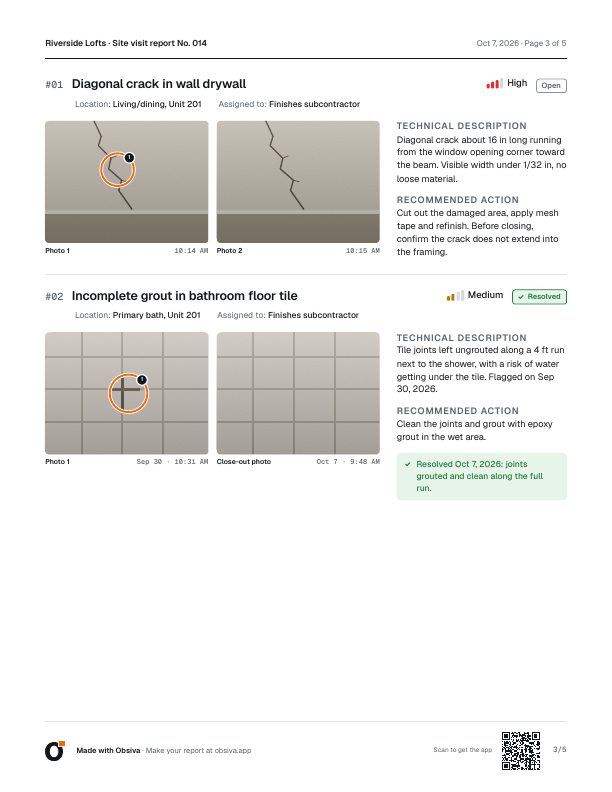
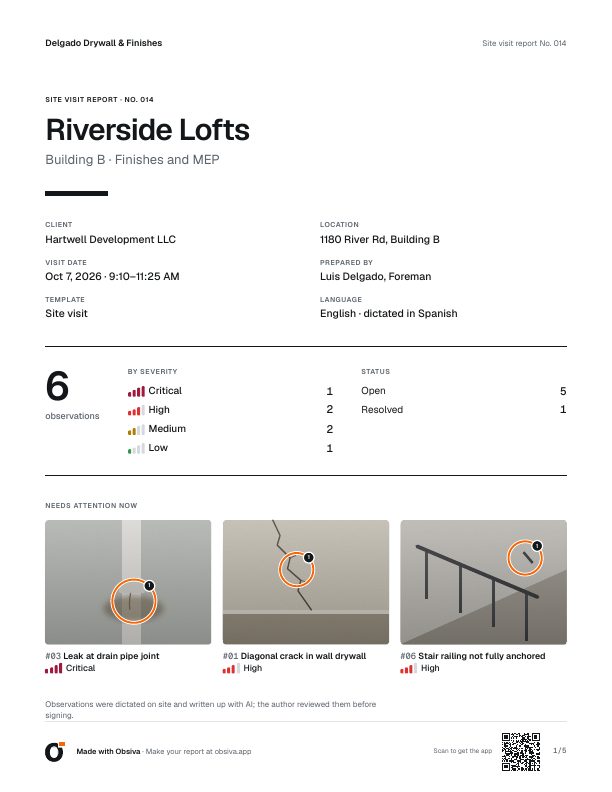
The same report, made with Obsiva

Annotated photos, every item with severity, responsible party and action, and a summary up front. Nothing to retype in Word.

Punch list app →

FAQ

Common questions

What is a punch list in construction?

The list of remaining work and defects at the end of a project, each with location, responsible party, due date and status. It has to be cleared before final handover and payment.

What is the difference between a punch list and a snag list?

None in practice: punch list is the US term and snag list the UK term. Both are the list of defects to fix before handover.

Does the template work in Google Sheets?

Yes. Open it in Google Drive; the drop-downs, filters and item count keep working.

Is the template free?

Yes. Download it, edit it and use it at your company without signing up. The files carry a small "Made with Obsiva" footer.

Can I do the punch list on my phone?

Yes. With Obsiva you photograph each item, say what's wrong and the app builds the list with responsible party and priority. On the next visit you see what's open, add the fix photo, and the PDF shows before and after.

Your next report, done on site

Install Obsiva for free: photos, voice and a PDF ready to sign. No account, no card.

Get it on Google Play

For now Obsiva is Android only.