Inspection and audit report app · Android
Dictate in your language. Deliver the report before you leave
Take photos, describe each finding out loud and Obsiva writes the inspection or audit report as a PDF: severity, responsible party and recommended action included. Review it, sign it and share it before you leave.

- Free to start
- No account needed
- Works offline
Obsiva is Android only for now. Open this page on an Android phone to install it.
 On a computer?Scan with your Android camera to install.
- Dictate in your languageDescribe what you see, like a voice note.
- AI writes, you reviewTechnical wording, ready to sign.
- Works offlineBasements, plants, rooftops and dead zones.
- A PDF ready to shareYour client has it before you leave.
The problem
Your report shouldn't cost you the evening
The inspection or audit is the quick part. The slow part comes later: moving photos from your phone to a laptop, pasting them into Word or Excel, writing up each finding from memory and exporting the PDF. Obsiva does that work while you're still on site.
How it's done today
- Photos scattered across your camera roll and messages.
- Notes on a pad, a paper checklist, or in your head.
- A Word or Excel file put together by hand at night.
- The client gets the report the next day, or later.
With Obsiva
- Every photo becomes an observation, sorted by time.
- You say what you see, standing in front of it.
- AI writes it up in technical language; you review and sign.
- The client gets the PDF before you leave.
How it works
From photo to PDF report in four steps
No long forms or Word templates. Talk like you would to a coworker and Obsiva turns it into a professional report.
- 1
Shoot photos or pick several from your gallery; each one becomes an observation. Mark the finding with arrows, circles or text.
- 2
Hold Dictate and describe it in your own words, in English or Spanish.
- 3
Obsiva fills in the title, location, technical description, severity, responsible party and recommended action. Everything is editable.
- 4
Close the visit and AI writes the executive summary. Generate the PDF with your signature and share it by email, message or whatever app your client uses.
The report
A PDF your client reads on their phone and you can sign
This is a report made with Obsiva, here for a construction site visit, dictated in Spanish and delivered in English. Sample data.
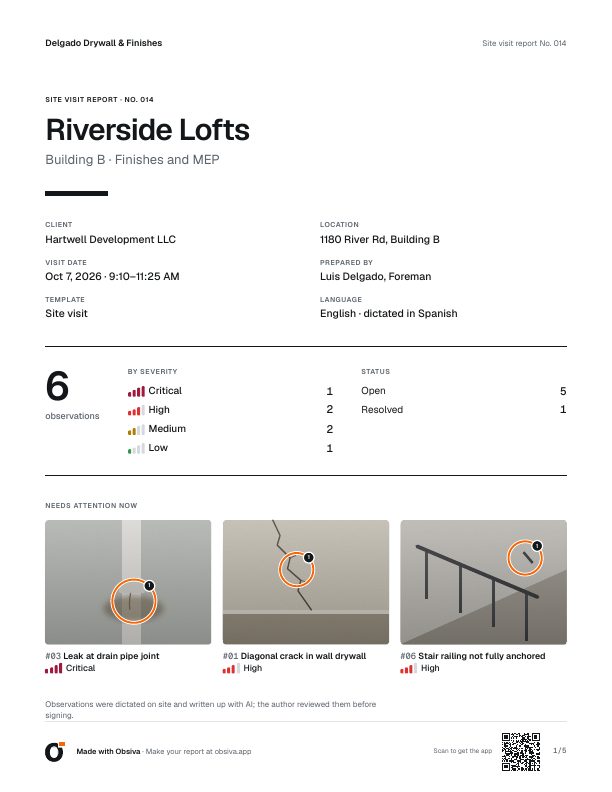
CoverTotals by severity and what needs attention now. It's the first thing your client sees.
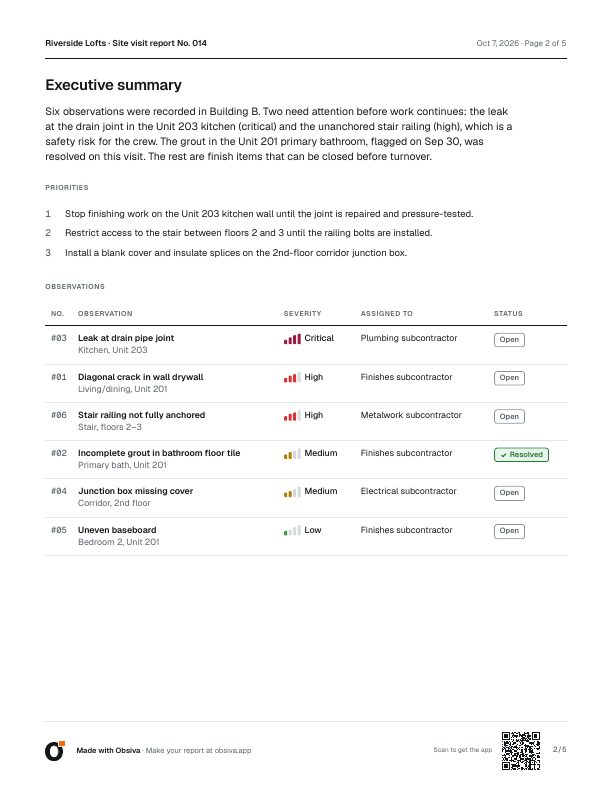
Executive summaryWritten by AI when you close the visit, with priorities and a table sorted by severity.
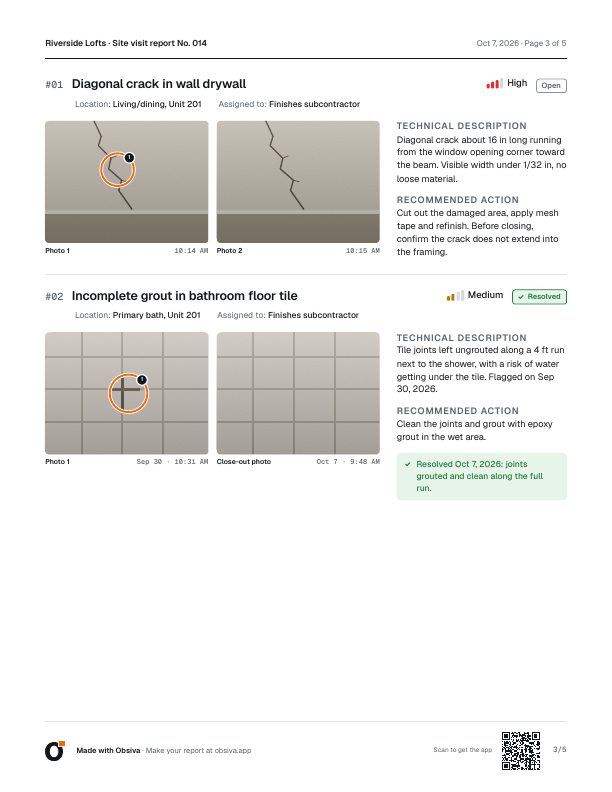
Observations with photosMarked-up photos, location, responsible party, description, recommended action and closure photo.
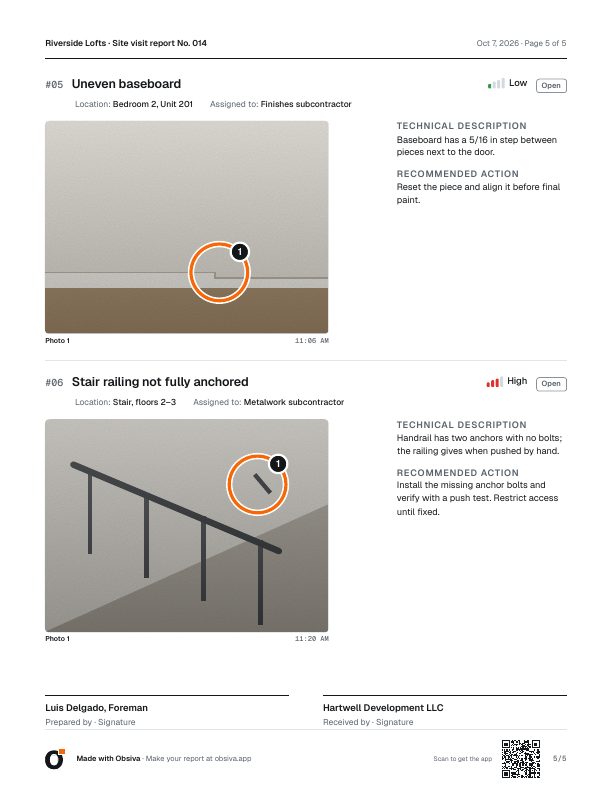
SignaturesFrom whoever prepared it and whoever receives it.
- Severity you can read even in black and white: a word and bars, not just color.
- Honest about AI: the report says AI drafted it and the author reviewed it. That protects whoever signs.
- Light enough to share: small enough for email or chat; prints clean on Letter or A4, in feet and inches or metric.
- Four designs: Classic and Photo for free; Compact and Executive with Pro.
Use cases
For people who inspect or audit in the field and answer to a client
If your job is to walk a place, find what's wrong and put it in writing, Obsiva is for you.
Construction
Site visits, progress reports and punch lists for contractors, with who needs to fix each item.
Health and safety
Safety inspections, unsafe conditions and acts, with the corrective action for each finding.
Facilities and maintenance
Rounds through buildings, plants and stores, tracked until every item is closed.
Property
Move-in and move-out inspections, unit handovers and building management.
Quality and operations audits
Stores, warehouses, restaurants and plants: findings with photo evidence and an owner.
Independent inspectors and consultants
A report with your signature and logo, delivered the same day you visit your client.
Built for the field
Made for the field, not the office
Sun, gloves, one free hand and a signal that comes and goes. Obsiva is built for that.
No signal? Keep working
Everything is saved on your phone. AI writes up your items when the connection comes back.
Photo markup
Arrows, circles and text on the photo to show exactly where the finding is.
Follow-up tracking
Mark each item resolved with a closure photo. Ready for the reinspection.
Report templates
General inspection for any industry, plus site visit and property handover.
Cloud backup
Your reports back up on their own, and you get them back when you switch phones.
One-handed
Big buttons and text you can read in the sun. One clear action per screen.
Dictate in Spanish. Deliver in English
Your team thinks in Spanish but the client, the head office or the general contractor reads English? Dictate the way you always talk and deliver the report in English, or bilingual side by side, with the right technical terms. Review and edit the translation before you send it.
Feet and inches or metric, depending on the report's country.
| Español | English | |
|---|---|---|
| extintor vencido | → | expired fire extinguisher |
| salida de emergencia obstruida | → | blocked emergency exit |
| fragua | → | grout |
| contrazócalo | → | baseboard |
Pricing
Start free. Go Pro when you need it
We never ask you to pay before you've shared your first report.
Free
$0forever
- 3 shared reports a month
- Up to 15 items per report
- AI included: 30 written-up items a month
- Classic and Photo PDF designs
- Your signature on the report
The PDF carries a “Made with Obsiva” footer.
Pro
Monthly or annual. Google Play shows the price in your currency.
- Unlimited reports
- Unlimited items per report
- Unlimited AI (fair use)
- Your logo, no Obsiva mark
- Reports in another language or bilingual
- All four PDF designs
Upgrade from inside the app whenever you need it. Cancel anytime in Google Play.
Start free, then go ProFAQ
Common questions
What is Obsiva?
An app that turns your photos and voice notes into an inspection or audit report in PDF. You say what you see, AI writes up each observation in technical language, and you review it before signing and sharing.
Is it only for construction?
No. It works for any inspection or audit done in the field: construction, health and safety, facilities and maintenance, property, quality or operations. The general inspection template fits any industry, and AI keeps the technical terms you dictate.
Does it work offline?
Yes. Photos, dictation and observations are saved on your phone. AI writes them up when you're back online, and you can keep working in the meantime.
Can I edit what the AI writes?
Always. Every field is editable before you generate the PDF, and the report carries a note saying AI drafted it and the author reviewed it.
How do I share the report?
It's a PDF: send it from your phone by email, text, Teams, Slack or whatever app your client uses, or save it to print.
Which languages does it support?
You can dictate in English or Spanish and deliver the report in the same language, the other one, or bilingual side by side. Reports in another language and bilingual reports are part of Pro.
Do I need an account?
Not to get started: install it and make your first report. Link your email to restore your reports when you switch phones.
Can I add my company logo?
Your signature is included on every plan. Your company logo in the header, with no Obsiva mark in the footer, is part of Pro.
Is there an iPhone version?
For now Obsiva is Android only, on Google Play.
What happens to my photos and data?
They're stored on your phone and, for backup, in the cloud. To write up observations, photos and the transcript of your voice are sent to AI providers. We don't sell your data.
How much does it cost?
Getting started is free: 3 shared reports a month, up to 15 items per report, AI included. Pro is a monthly or annual subscription; Google Play shows the price in your currency.
Your next report, finished on site
Install Obsiva for free and make your first report on your next inspection. No account, no card.
Obsiva is Android only for now.
Scan with your Androidto open Obsiva on Google Play.